2015-06-03

Go.next-search.net Hijacked Your Browser ? - Quickly Get Rid of Annoying Browser Hijacker

About Go.next-search.net

Go.next-search.net looks like a clean and safe page, but you should watch out. It is a harmful browser hijacker .
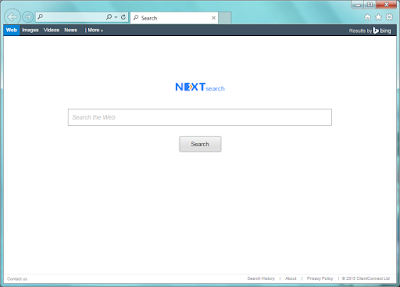


Users have no idea about the hijacking until they found the default homepage is modified to Go.next-search.net. And they also find it difficult to reset the browser. Ads links are displayed in the search results instead of useful information,and unfamiliar sites may be added in your Favorite without your permission. You had better not click on the ads because they may redirect you to strange sites. Malicious sites and hacked page brings more computer problems like trojans and worms.

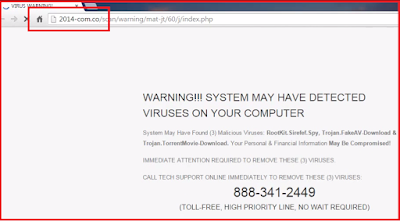
Security Warning of 2014-com.co Domain - Do Not Be Fooled by This Pop-up

Viruses Detected? Falsehood


Such a pop-up of 2014-com.co domain comes suddenly on IE, Firefox and Chrome. It says that system may have detected viruses on your computer, and suggests you to call 888-341-2449 for help.
Don't be fooled,this is just a fake alert brought by adware, your computer security is not as bad as it describe. The horrible message aims to make you believe that your computer need a professional helper. If you are cheated and call the offered number, you will be required to pay for the so-call tech-support. You should remember that if there is a page asking you to call the third party numbers, it must be a trick.


2014-com.co adware comes bundled with freeware installations, or it can be spread via hacked pages and malicious sites. Users should be careful. When you see similar pop-ups, you should try reliable AV program to scan your computer and remove this adware in time.

Best Way to Remove Roaming Rate Ads - Remove Adware from IE / Chrome / Firefox

Information about Roaming Rate 


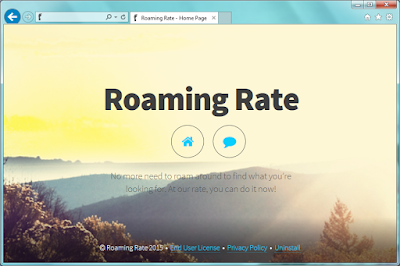
Roaming Rate is an adware. If you see Ads by Roaming Rate frequently, your browser may have been infected with it.


Roaming Rate is unwelcome to most users because it is promoted in bundling way. When users install some freeware, this application can be added on your browser as an additional one as well.

To achieve the purpose of promoting related programs and services, Roaming Rate may collect your browsing history to know your concerned search terms, then deliver targeted ads to you. Do not mistakenly believe that the extension is helping you, watch out about your private privacy instead.

Windows Firewall Warning? Do Not Trust in Pop-ups of functive.in Domain

Pop-up of functive.in domian is bogus


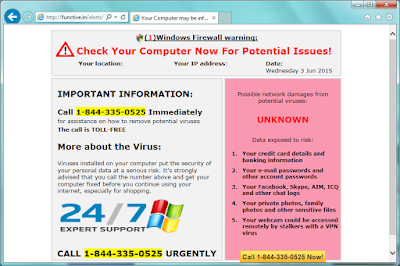
Users of Firefox, Chrome and IE may see a pop-up warning of functive.in domain. It says that your computer is infected with viruses, and suggests you to make a free call to 1-844-335-0525 for help.
Don't be fooled,this is just a fake alert brought by adware, your computer security is not as bad as it describe. The horrible message aims to make you believe that your computer need a professional helper. If you are cheated and call the offered number, you will be required to pay for the so-call tech-support. This is a common trick targets inexperienced users .


Functive.in adware comes bundled with freeware installations, or it can be spread via hacked pages and malicious sites. Users should be careful. When you see similar pop-ups, you should try reliable AV program to scan your computer and remove this adware in time.

2015-06-02

Excellent Coupons Ads Keep Coming ? How to Stop Them Effectively ?

Information about Excellent Coupons


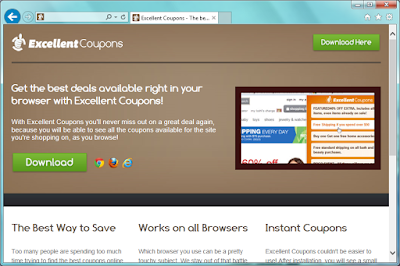
Excellent Coupons is an adware. It has versions for Google Chrome, Internet Explorer and Mozilla Firefox. Though it claims to be a good helper in online shopping, users should know that the ads it brings are quite annoying.


Excellent Coupons can offer related coupons, products comparisons, suggested price and other services about shopping. However, it provide for the purpose of promoting the related products, rather than helping users indeed.
It generates pay-per-click revenue, your visiting will benefit the developer for the increased web traffic, but you will probably get nothing helpful.To achieve the purpose, Excellent Coupons may collect your browsing history to know your concerned search terms. You will see that the ads are associated to your preferred things. You should watch out about your private privacy.

Virusbeater.com Pop-up Removal Instruction - See Through Fake Security Alert Tricks

Do not believe in virusbeater.com


Virusbeater.com domain sounds like a standard antivirus site, isn't it? However the pop-up from it is so malicious. As the picture shows, the pop-up page says that your computer is suffering security threats and advise you to call 1-855-295-7473 for help.
Don't be fooled,this is just a fake alert brought by adware, your computer security is not as bad as it describe. The horrible message aims to make you believe that your computer need a professional helper. If you are cheated and call the offered number, you will be required to pay for the so-call tech-support. This is a common trick targets inexpensive users .


Virusbeater.com infected popular browsers like Mozilla Firefox, Google Chrome and Internet Explorer. Users should be careful. When you see similar pop-ups, you should try reliable AV program to scan your computer and remove this adware in time.

2015-06-01

Stop Fake Update Pop-up of secureopensoftware.com - Remove Annoying Adware Conveniently

Recommended Update? Watch Out!


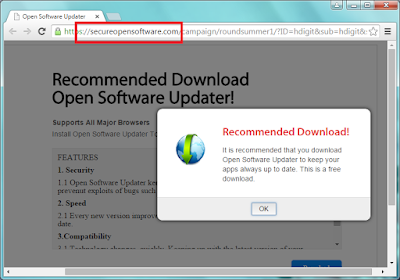
Do not trust such updates of secureopensoftware.com domain. It is a fake update warning offered by an adware. This message  aims to treat you to download dubious programs and earn pay-per-download revenue. If you are cheated and click to down, you may get unwanted programs that are harmful to your PC. You should visit the official site, or use some reliable software to check the updates of your system and programs.


Secureopensoftware.com infected common browsers like Google Chrome, Mozilla Firefox and Internet Explorer. It is spread by malicious pages and hacked pages, or bundled into third party installations. The pop-ups will come back again and again if you don't remove the adware completely. When you see similar pop-ups, you should try reliable AV program to scan your computer and remove this adware in time.