2015-07-23

Free Java Security Update? - See Through Javafastversion.com Pop-up

About javafastversion.com Pop-up

Javafastversion.com domain pretends to be normal free Java update, however it is an ad brought by malicious adware. No matter what it says, you should not download anything from it. The pop-up comes frequently on infected browsers like IE Firefox and Chrome. Because of its domain name containing "Java","Fast"and "Version" , many users are misled to download its program.


javafastversion.com offers suspicious program instead of real Java updates, and most of them are detected to be quite dangerous. If users get cheated by it and download more unwanted programs, they will have to bear poor computer experience. This adware can be brought by malicious sites, or it is bundled with other freeware installations. The same pop-up will keep disturbing you unless you remove it completely.
You can read the rest of this article to learn to remove it effectively.

Exclusive-rewards.7743.info Removal Tips - Stop Scam Message Effectively

What is exclusive-rewards.7743.info pop-up


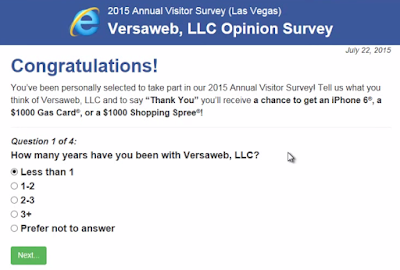
Exclusive-rewards.7743.info domain page pops up when users are trying to browse normal sites. It tells the reader that they are so lucky to get a gift from Versaweb, LLC.

When you see this message, you must keep a clear head. This message is bogus, it is provided by an adware. It aims to take readers in scams like these:

Victims are required to leave their email addresses, then they will receive spam mails contain malicious codes or even trojans.
Or victims are asked to pay for the tax before getting the reward. However they will get nothing after pay the money.

Similar scams are targeting inexperienced users. You may want to know that malicious codes will modify your browser setting and make exclusive-rewards.7743.info come every time you open your browser. The right thing to do is to remove the adware and fix your browser, otherwise the pop-up will keep coming again and again.

2015-07-22

Customer Service 1 844 666 1375 ? Do Not be Taken in Gooblesearch.com Scam

What is gooblesearch.com pop-up

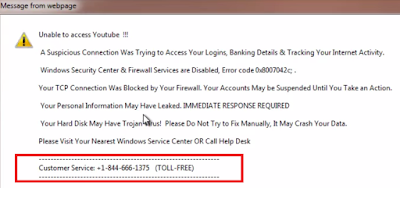
The message from Gooblesearch.com domain page is quite horrible, it describes that there are many problems in your computer including trojans and so-called System error code 0x8007042c. It requires users to call 1 844 666 1375 to fix these threats.

When you see this message, you should know that your browser need to be fixed. Not because of dangerous trojans , but for the adware on it. This message is fake message provided by an adware. If you call the given number, you will be required  to pay for the so-called tech support sooner or later. Or you will be recommended a removal tool with purchase, to deal with the non-existed viruses.

You should rely on reputable AV programs to protect your computer instead of believing in the so-called tech support.Such adware come to your browser if you visited sites with bad reputation or installed questionable freeware. The malicious codes will modify your browser setting and make gooblesearch.com come every time you open your browser. The right thing to do is to remove the adware and fix your browser, otherwise the pop-up will keep coming again and again.

CouponXplorer Removal Instruction - How to Get Rid of Unwanted Toolbar

Introduction to CouponXplorer

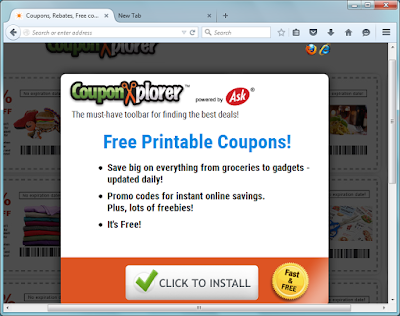
CouponXplorer works as a toolbar on Mozilla Firefox, Internet Explorer and Google Chrome. Users may be attracted by its homepage, which claims to help users get free printable coupons. But you should be careful that this a PUP (potential unwanted program) for some reasons.


CouponXplorer is also promoted bundled with freeware which have poor reputation. Once it comes to your browser, it will probably modify your default homepage and search engine during installing. Users found that their default homepage was changed to home.tb.ask.com automatically. 
This search engine offers limited search result, users get less useful information. On the contrary, ads and sponsor links flood your browsers. Users have to bear related ads every now and then. The toolbar is also trying to promote other harmful programs to earn pay-per-click revenue, some of them are detected to be dangerous.

Useful Tips to prevent such unwanted programs:

  • Keep away from dubious sites.
  • Use powerful AV programs
  • Do not open spam mails
  • Visit standard page to get safe software

2015-07-21

How to Stop Bogus Security Warning Message from Vps-6294.fhnet.fr Domain Page

What is vps-6294.fhnet.fr pop-up

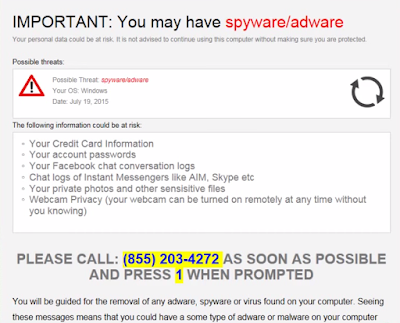
Vps-6294.fhnet.fr page comes when you try to visit common pages, saying that your browsers need to be fixed and you are advised to call 8552034272. Due to its description about the possible risks including credit card information and account passwords, many users get panic and do as it says.

However you should keep a clear head. This message is fake message provided by an adware. If you call the given number, you will be required  to pay for the so-called tech support sooner or later.
You should rely on reputable AV programs to protect your computer instead of believing in the so-called tech support.
Such adware come to your browser if you visited sites with bad reputation or installed questionable freeware. The malicious codes will modify your browser setting and make vps-6294.fhnet.fr come every time you open your browser. The right thing to do is to remove the adware and fix your browser, otherwise the pop-up will keep coming again and again.

Browser-service-check.info Pop-up Removal Tips - Best Way to Stop Annoying Fake Security Error Message

What is browser-service-check.info Pop-up


From a victim:
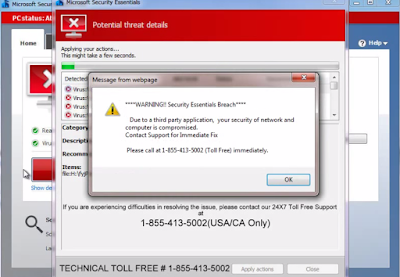
" I found a page pops up on my browser frequently. It says that the security of network and computer is compromised and suggests me to call 18554135002 for support. This pop-up can't be closed. It seems quite horrible."

If you see the same pop-up, don't be panic yet. Although Browser-service-check.info domain name contain "Service" and "Check", it is a fake message provided by an adware in your computer. Do not call the given number, other wise you will be taken in scams. The so-called supporter will required you to pay for the tech support or some removal programs. You are advised to use good scanners, instead of calling dubious numbers.

This adware is usually brought by some third party freeware. They may modify the browser setting to ensure the pop-up comes frequently. You should remove it from your browser to stop the pop-up permanently.

2015-07-20

MacMin Adware Removal Tips - Guide to Stop Browser Ads in Efficient Ways

What is MacMin


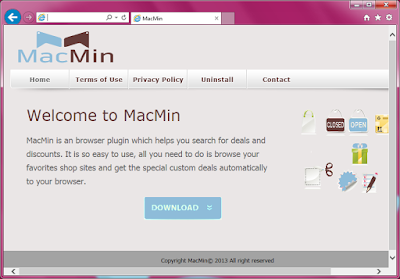
MacMin is a browser plugin claims to offers deals and discounts for online shoppers. Though it looks quite helpful , you need to consider twice before installing it because it is a typical adware that brings countless ads to users.
MacMin ought to search for the best products for users, unfortunate it does not work as well as it advises. Actually, this adware's main mission is to display the related advertisements to users instead of offering real suitable products and services. The ads are mostly linked to dubious sites that users may get unwanted programs downloaded by blindly clicking on it.
To attract users' attention, MacMin will keep an eye on the browser habits including browsing history, your typed URL and recent search terms, so that it can deliver associated ads to users. You will not want to see the search terms are remembered and shown on the browsers, that may cause embarrassment.
Though the adware have an official site, most users get it bundled with third parties. So it looks much more annoying when users don't need a shopping help at all. To stop the ads and have a better browsing experience, you can remove the plugin with the removal instruction below: