2015-08-19

Stop Annoying Pop-ups on Your Browsers - Guide to Remove Bogus Message from Privacysecurity.info

Do you meet the same problem?

"I saw a pop-up comes on my Firefox frequently. It says my computer may have spyware or adware, and suggests me to call 844-250-7259 for help. I did not have any anti-virus program, is this pop-up by Windows? Do I have to call the number?"

Know about privacysecurity.info Pop-up

Privacysecurity.info pop-up is a malicious page, you can't believe a word from it. It offers bogus detected report and mislead users to call the fake help line, so that it can promote related removal tools and services. What's more, it can probably bring trojans. Victims who try to pay the bills online will suffer great loss.


This malicious pop-up comes because your browsers settings are modified. You browsers can be infected if you had visited malicious page like dubious ads on porn sites. It is necessary to stop the pop-ups and reset your browsers completely.


2015-08-18

Reasons to Keep TypingFanatic Away From Your PC - Fix Hijacked Browsers

Know about TypingFanatic

TypingFanatic is classified as a PUP (potential unwanted program) for reasons. This plugin claims to improve your typing speed and accuracy with typing test, but you should know it also bring troubles as well.
TypingFanatic is unwelcome for the questionable promoting method, its hijacking feature and the unwanted ads it brings. This plugin can be hidden in some other freeware' installations as an additional tool, it can be installed without users' knowledge. During installing, it will probably modify your default homepage and search engine. Users found that their default homepages are changed to home.tb.ask.com automatically. This search engine offers limited search result, they are full of junk information. Ads and sponsor links will flood your browsers. You will see ads of it haunting on your browser, promoting its similar plugins and toolbars. Your browsing experience can be ruined finally.

Remove Computerrepairupdate.net Pop-up - Stop "Install Flash Player Pro to Continue" Messages

What is computerrepairupdate.net

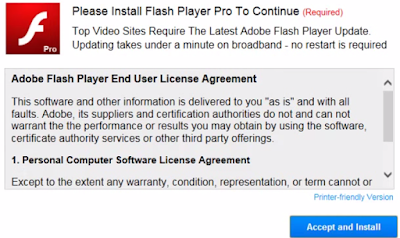
Computerrepairupdate.net pop-up comes when users try to browse normal pages. It requires users to install the "Flash Player Pro" to continue. Although users can just shut it and keep on browsing, the pop-up will come again and again until users get bored and install what it offers.


However you should not be fooled. This message is provided by the adware on your browser. It provides unwanted programs instead of real flash players. The files from it are detected to be extremely dangerous and destructive.
Obviously this adware try to earn pay-per-download revenue. Your browsers' setting can be modified without your permission, and such malicious pop-up comes as soon as you open your browser or a new tab. The modification was probably done by malicious sites you visited, or malware and trojans in your computer. Anyway, what you need to do is to remove the adware and clean up your browser in right ways.

DealXplorer Removal Help - Step to Get Rid of Annoying Adware

Harmful traits of DealXplorer:


  • It is usually bundled with freeware. Users get it inadvertently.
  • Common browsers like IE, Chrome and Firefox are easy targets of it. 
  • It brings pop-ups, banners and other kinds of ad as soon as it enters your PC.
  • Some advertisements are linked to dubious sites, visitors get unwanted programs downloaded.
  • The junk information can obviously reduce users' browsing experience, even slow down the browsers.

DealXplorer is not a typical virus, but you will not ignore the inconveniences it brings. Since it earns pay-per-click revenue, this adware won't miss a chance to display related ads to users. If you get bored with the helpless information haunting on your browsers, you can try to remove it as soon as possible.

2015-08-17

How to Get Rid of Yourwebing.com Browser Hijacker - Rescue Your Hijacked Browser

What is Yourwebing.com

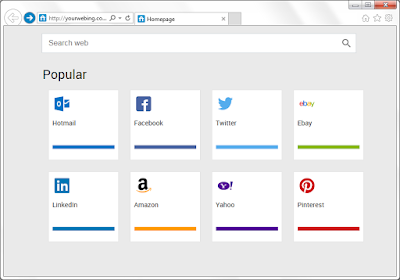
Yourwebing.com page is not an exactly malicious page, but it brings troubles indeed. When your browsers are hijacked by this page, it is not a convenient default homepage.


Yourwebing.com hijacking causes these inconveniences: 
  • It locks your default homepage and search engine. 
  • It redirect users to Google search results, which takes longer time.
  • It is difficult to avoid being redirected by the shortcuts on it.
  • Unwanted programs and plugins can be brought by these links.
  • Strange sites are added to your Bookmarks and Favorite.
  • The hijacker also brings related adware, pop-ups can be seen on browser frequently.
If you need Google search results, you can use Google directly. This page should be removed as soon as possible.

Blue Screen Error 0x000000CE - How to Deal With It Correctly

See Through "Blue Screen Error 0x000000CE" pop-up


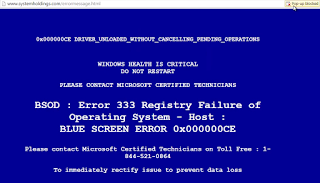
As the picture shows, Blue Screen Error 0x000000CE comes with the blue background and the white warning words, saying:

Windows health is critical 
Do not restart
BSOD : Error 333 Registry Failure of Operating System - Host:
Blue Screen Error 0x000000CE

Then it offers a random number, claiming that users need to call this number to solve the problems. Many users are taken in this scam without knowing what exactly the problems are.
In fact this is a misleading ad on your browser, there is nothing wrong with your system, except the adware which offers this annoying ad. Victims who call the given number will be required to purchase removal tools or service.
When you meet this kind of pop-up, what you need to do is rely on powerful scanners, instead of calling a dubious number. The related adware modified your browsers settings so that the pop-up will keep coming as long as you open the infected browsers. To get rid of it, you need to clean up your browser throughly.

2015-08-14

How to Stop ArcadeCandy Ads Easily and Effectively

What is ArcadeCandy

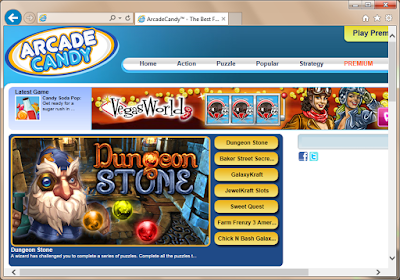
ArcadeCandy is classified as a Potential Unwanted Program for reasons. It is not a virus, but the troubles brought by it can't be ignored. Many users reported that ads by ArcadeCandy haunting on the browsers and it is difficult to get rid of them. The ads can be linked to dubious pages, which contain unwanted programs downloads. Trojans and other virus can be spread in this way.


Common symptoms of ArcadeCandy

  1. Pop-ups, banner, in-text ads and other kinds of advertisements keep coming.
  2. You can see labels like “Brought by ArcadeCandy” in the ads.
  3. You are redirected to malicious sites randomly.
  4. Your browser works slowly, especially when you try to open new pages.
  5. More and more unwanted plugins are installed on your browsers.