2015-08-21

Browser-infection-alert.com Pop-up - How to Stop it From Your IE/ Chrome / Firefox

Know about browser-infection-alert.com Pop-up

browser-infection-alert.com comes on common browsers like IE, Chrome and Firefox. This page sends pop-ups which look like virus detected report and warning, claiming that users need to call 1-855-495-4100 for help.
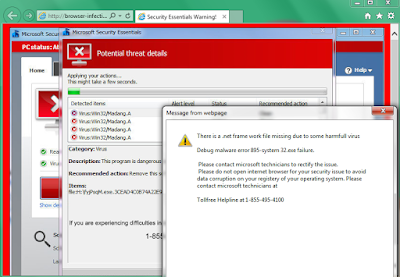

You need to distinguish, even though its domain name is a perfect disguise. This pop-up is not a real virus warning. It is a bogus message supported by the adware on your browsers. It aims to promote related programs and service. Victims who call the given number will be required to purchase to fix the so-called threats. The financial information can also be leaked out and cause further loss.

Your browsers can be infected if you had installed malware. They modify the browser settings so that Browser-infection-alert.com keeps coming. You should try to remove it to prevent further threats.

2015-08-20

Troubled by DealGrabbers Ads? - Reasons to Get Rid of This Annoying Adware

What is DealGrabbers

DealGrabbers is a browser plugin designed for Chrome, IE and Firefox. Online shopping fans can be attracted by it because it claims to offer convenient function in searching coupons and offering better deals. However, most users get this adware via software bundle, even though they don't shop online at all. Besides the questionable spreading method, DealGrabbers is complained because it actually offer promoting ads rather than giving helpful shopping information.

Once this plugin is install, users will see banners, pop-up and other kinds of ads are displayed on the infected browsers. These ads may be attractive to you because they contain your concerned information. You should know that is because the adware will secretly record your browsing habits and history, including your typed URLs, preferred sites and recent search terms. These information are used for commercial purpose like delivering targeted ads. Additionally, the ads will probably redirect you to dubious sites and may caused more unwanted programs downloaded.

You are suggested to remove this adware from your browser to have cleaner browsing experience.

PariceIChop Ads Removal Help - Guide to Stop Unwanted Ads on IE/ Chrome / Firefox

Symptoms of PariceIChop

  • Ads with labels like "Powered by PariceIChop" are displayed on every site you visit.
  • Browsers are slowed down obviously 
  • Unwanted programs are brought to your PC without permission.
  • The ads disturb your browsing experience and redirect you to suspicious pages.

What is PariceIChop exactly?

PariceIChop is an adware which should be responsible for the non-stop ads on your Chrome / IE / Firefox. This adware generally comes to your PC bundled with third party freeware. If you use the default way in installing freeware, this kind of unwanted program can be added as an addition without your knowledge. Once this adware sneaks on your PC, it begin to display different kinds of ads. Although it seems like shopping helper, you should not believe its information. The ads by it are trying to promote related products and services, rather than helping you. If you get bored with the annoying pop-ups, you should try to remove PariceIChop permanently.

Recommended Methods to Remove Nitrodeal Adware Completely

Know about Nitrodeal

Nitrodeal is an adware, it works as a browser plugin on popular browsers like Chrome, IE and Firefox. This plugin is unwelcome for its questionable promoting way. Though it claims to be a good helper in online shopping, most users get it bundled with other freeware, without their knowledge.
Once this plugin enters your browsers, it begin to display commercial ads. There ads are so annoying because they not only disturb users' browsing experience, but also can redirect users to malicious sites. Victims can be taken to some freeware center and they will get unwanted programs, misled by the ads. Finally the unwanted programs make the users' computer a mess by modifying the system settings. What's more, the adware may keep an eye on your browsing history like your preferred sites and recent search terms, so that it can deliver associate ads. It is not safe to keep Nitrodeal.

2015-08-19

Stop Annoying Pop-ups on Your Browsers - Guide to Remove Bogus Message from Privacysecurity.info

Do you meet the same problem?

"I saw a pop-up comes on my Firefox frequently. It says my computer may have spyware or adware, and suggests me to call 844-250-7259 for help. I did not have any anti-virus program, is this pop-up by Windows? Do I have to call the number?"

Know about privacysecurity.info Pop-up

Privacysecurity.info pop-up is a malicious page, you can't believe a word from it. It offers bogus detected report and mislead users to call the fake help line, so that it can promote related removal tools and services. What's more, it can probably bring trojans. Victims who try to pay the bills online will suffer great loss.


This malicious pop-up comes because your browsers settings are modified. You browsers can be infected if you had visited malicious page like dubious ads on porn sites. It is necessary to stop the pop-ups and reset your browsers completely.

2015-08-18

Reasons to Keep TypingFanatic Away From Your PC - Fix Hijacked Browsers

Know about TypingFanatic

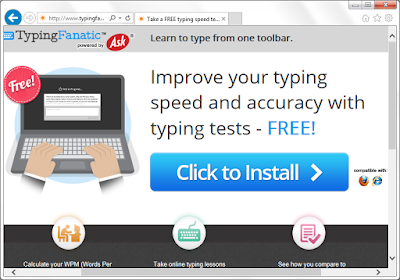
TypingFanatic is classified as a PUP (potential unwanted program) for reasons. This plugin claims to improve your typing speed and accuracy with typing test, but you should know it also bring troubles as well.
TypingFanatic is unwelcome for the questionable promoting method, its hijacking feature and the unwanted ads it brings. This plugin can be hidden in some other freeware' installations as an additional tool, it can be installed without users' knowledge. During installing, it will probably modify your default homepage and search engine. Users found that their default homepages are changed to home.tb.ask.com automatically. This search engine offers limited search result, they are full of junk information. Ads and sponsor links will flood your browsers. You will see ads of it haunting on your browser, promoting its similar plugins and toolbars. Your browsing experience can be ruined finally.

Remove Computerrepairupdate.net Pop-up - Stop "Install Flash Player Pro to Continue" Messages

What is computerrepairupdate.net

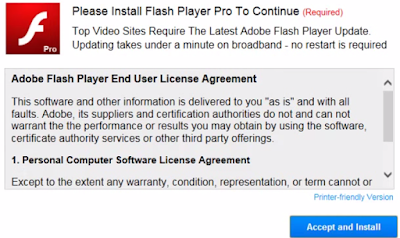
Computerrepairupdate.net pop-up comes when users try to browse normal pages. It requires users to install the "Flash Player Pro" to continue. Although users can just shut it and keep on browsing, the pop-up will come again and again until users get bored and install what it offers.


However you should not be fooled. This message is provided by the adware on your browser. It provides unwanted programs instead of real flash players. The files from it are detected to be extremely dangerous and destructive.
Obviously this adware try to earn pay-per-download revenue. Your browsers' setting can be modified without your permission, and such malicious pop-up comes as soon as you open your browser or a new tab. The modification was probably done by malicious sites you visited, or malware and trojans in your computer. Anyway, what you need to do is to remove the adware and clean up your browser in right ways.