2015-09-15

Remove Searchnewtab.com Hijacking Step by Step - Effective Solution to Deal with Browser Hijacker

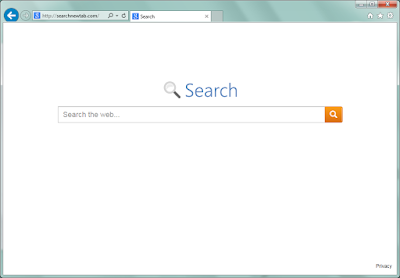
Searchnewtab.com looks simple and innocent, so when it takes place of some users' default homepage, they do not pay much attention. However, you should know that this browser hijacker can bring threats more than you think.

Reasons to refuse Searchnewtab.com

  • Homepage hijacking. Your default homepage and search engine can be locked as it and it is difficult to reset it successfully. 
  • Poor searching experience. This search engine offers limited search results. Ads and sponsored spams are displayed instead of helpful information. 
  • Redirects. Users' daily browsing can be redirected to unwanted sites, which contain dangerous features that will lead to various problems.
  • It bring unwanted plugins and toolbars. Strange sites are added to your bookmarks and favorite folders without your permit. 
It is recommended to use some really efficient search engines such as Bing and Google.

2015-09-14

Search8844.com Removal Tips - Get Rid of Browser Hijacker Easily

What is Search8844.com

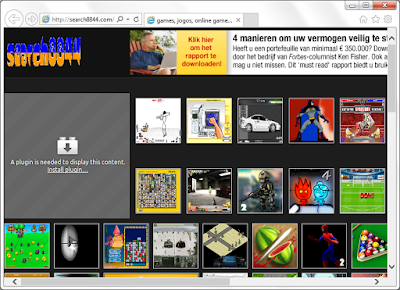
Search8844.com is messy page, which contains many mini online games and ads on it. Obviously it is not a suitable page to be used as your default homepage. However, many users are force to see it every day, because this page had hijacked their browsers.


Harmful traits of Search8844.com you should know about:
  • It locks your default homepage and search engine. 
  • It is hard to avoid being redirected since there are so many links on it.
  • Users have to suffer poor browsing experience since it takes time reloading the unwanted information.
  • Unnecessary toolbars and plugins are brought without permission. 
  • It also bring pop-ups, banners and other kinds of ad to bother your browsing.
Even to game fans, this site is annoying. Needless to say, most users need an efficient and simple search engine as their default homepage. It is quite necessary to remove this page as soon as possible.

Safe and Quick Ways to Removal SalesSale - Adware Removal Tips

Is your computer infected with SaleSale ads? 
Are they reliable?
How to get rid of them permanently?


Introduction to SaleSale 

SaleSale is a browser extension. This plugin is usually spread bundled with freeware. For example, if you install a freeware and click to every "Accept" or "Next" button blindly, SaleSale can be brought as an addition accidentally. Although it claims to be a helpful tool in saving money and recommending better deal, you should notice its negative properties.
As a typical adware SaleSale will not miss a chance to deliver non-stop ads in the forms of banners, coupons, pop-ups and so on. They are not helpful to your online shopping experience, but keep coming to disturb your browsing instead. To ensure the ads are attractive to you, SaleSale may record your browsing history. Tracking cookies, typed URLs and search terms and other privacy information can be used for reference, and targeted ads will to displayed on your browsers every now and then. They can be offered to third parties and caused privacy issues. SaleSale is also complained for its redirecting feature. User are redirected to some dubious sites against their will, that may lead to more unwanted programs downloaded and installed. Needless to say, browser hijacking is often caused by the redirects.
SaleSale helps less and brings more troubles, take actions to remove it in time.

2015-09-11

Stop youdllfile.com Pop-up from Disturbing You

What is youdllfile.com

Youdllfile.com domain pop-up is found on common browsers. It may appear when you are going to open any page, recommending a video payer update to you , even when the page you browse does not need the playing function.
No matter how it describes on the page, you should not download the file it offers. It is actually a malicious ad. You will receive malware, PUPs or even trojans, anything but a real video player. This ad aims to earn pay-per-download revenue, that's why it grab every opportunities to show you the misleading information.
If you are bored about being redirected and the unwanted programs, you need to get the unwanted adware and plugins removed to stop the pop-up.

2015-09-10

How to Fix BSOD : DllRegisterServer Failed - Block system-notifications1.com Pop-up

What is system-notifications1.com

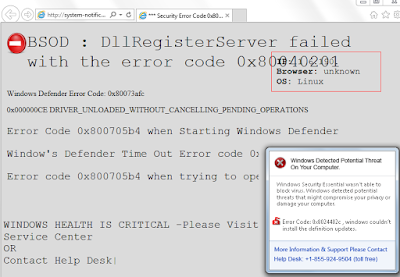
system-notifications1.com page comes to your Firefox, Chrome and IE. It offers some information to describe that your window health is critical and suggests that you need to call 1-855-924-9504 for help.


Look at the error codes it offers: 0x80040201, 0x80073afc, 0x800705b4 and so on. Even a computer security expert can'the explain these, because they are totally false. This message is an ad, it is supported by the adware in your PC. Its main purpose is to lead you to call the given number. And if you do as it orders, you will finally receive some programs that are claims to be removal tools. They are even Trojan files that will harmful your computer badly. Another version of this scam is that you are offered so-called removal services and surely demanded to purchase them.
You should not be fooled by its misleading domain system-notifications1.com. Taking actions to remove the related adware is the right thing to do.

Guide to Block PlayGEM Ads - Adware Removal Help

What is PlayGEM

No matter how it advertise itself, PlayGEM is nothing but an adware. This adware can be downloaded on its official homepage by game fans, or it can be hidden in the installations of other freeware. It is responsible for the banners and pop-ups ads on your browsers, even you can see the sponsor information in the search results. It sends these ads to earn pay-per-click revenue. For this purpose, PlayGEM keeps an eye on your browsing habits like cookies, search terms, typed URLs and preferred sites. For example, if you had search for "watch" on your Google, PlayGEM may get this word and keep delivering targeted ads to attract your attention. You will see different kinds of ads about watches. Sometimes this feature causes embarrassment or even leads to privacy leaked out, when you want to keep a secret about what you searched.


2015-09-09

Haunting Ads by Sizlsearch - How to Stop them from Chrome/ IE / Firefox

What is Sizlsearch

Sizlsearch claims to be able to enhance user's browsing performance, like searching the web for comparing online deals and finding the best price. It has different versions for Chrome, IE and Firefox so it can appear on most of your browsers. However, this plugin is not welcome, because its questionable promoting method and the unpleasant problems it brings.


Sizlsearch may come to your browsers as an addition of third-party freeware, so many users have no idea about its existence until these problems are found:
  • Sizlsearch displays ads including pop-ups, banners and floating boxes, they grab every chance to show you the promoting information.
  • Browser hijackers can be brought. Users found their browsers' default homepages are locked as the unwanted sites. It is difficult to remove. 
  • It may record your browsing habits like preferred sites, typed URLs and recent search terms, in order to deliver targeted ads and earn pay-per-click revenue.
  • Redirects happen frequently, especially when users try to click the ads to know about their concerned information.
  • Browsers performance are reduced. It takes longer to reload the unnecessary information.
Users should remove this adware immediately to prevent potential risks. You can try the removal tool to remove it quickly or read the rest of this blog and operate following the instruction.