2015-11-24

How to Solve Search.snapdo.com Hijacking Easily and Quickly

What is search.snapdo.com

Search.snapdo.com page can be seen by Firefox, Chrome and IE users. This page will replace your homepage and search engines without your permission, and it offers no effective search results but messy searching experience.
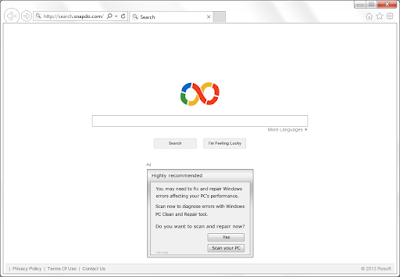

The banner ad on Search.snapdo.com is so conspicuous. It is recommending a dubious program and users who use it will only find their computer messed up. Besides such a banner, more ads will be displayed in the form of pop-ups. Pages will pop up as a new tab to catch your attention. All these ads are risky and you should never click them, to avoid being redirected. Even you are careful in ignoring the malicious ads, you may notice the browsers are slowed down. The infected browsers will get no response and even crash frequently.
Additionally, the hijacker may keep an eye on your browsing history. Your recent search terms, preferred sites and typed URLs will be used for reference to deliver customized ads to attract your attention, then redirect you to irrelevant pages. It is worthy to be worried about because your privacy information can be leaked out and lead to embarrassments even financial loss.
There are several ways to get infected with such a hijacker. The malware and trojans you got from dubious software center will make the modifications to your browsers settings and registry data against your will. Clicking to malicious ads and spam mails will also lead to browsing hijacking. You should clean up all the threats throughly to get rid of the annoying browser hijacker.

2015-11-23

Get Rid of safedownloadsrus165.com Fake Update

Do not trust a word from safedownloadsrus165.com

Safedownloadsrus165.com domain page says: "The latest version of DriverFinder is ready to install now, it wouldn't take long to upgrade and you would get the lasted updates and fixes." 


Some users are cheated by this page and download the file it offers. However they finally found that their browsers get slowed down and the performance get reduced. You should know that such a page is a malicious ad, which tries to mislead users to download its files to generate pay-per-downloaded revenue. 
Seeing this pop-up means you got unwanted plugins and adware in your computer. They modify the browser settings and registry data to send the pop-up as soon as you run the infected browsers. It is quite necessary to clean up your browsers and unnecessary programs permanently.

2015-11-22

Troubled by Bronze Aid Ads? - Easy Guide to Remove Annoying Adware

Know about Bronze Aid

Bronze Aid ads can be seen on Internet Explorer, Google Chrome and Mozilla Firefox. They can keep coming on any site you browse, even replaced the local ads on shopping sites like Amazon and eBay. You may want to know that the they are supported by Bronze Aid adware in your computer, and you are perhaps a victim of this unwanted adware. Like the majority of adware, Bronze Aid come to users' browsers by accident, if you had clicked dubious ads and hacked page, or installed a freeware from the software center, then this adware can be brought as an additional tool without your notice.


You will perhaps see these symptoms :
  • Countless ads on your infected browsers including pop-ups, banners and boxes.
  • The browsers become sluggish, freeze and crash happen frequently.
  • The ads contain your concerned information, but redirect you to irrelevant sites.
  • More unwanted extensions and bookmarks are brought without your permission.
  • Your browsers' default homepage and search engine can be replaced by unwanted ones.


Bronze Aid aims to lead the users to click the ads, and benefit from the sponsors. To achieve its goal, this adware will probably use your tracking cookies to deliver targeted ads. That’s why the ads are usually related to your concerned information and attract you a lot. But you should never click the ads because they are mostly linked to dubious sites, you will get nothing useful but malware downloading. Computer security experts suggest that user should remove this adware as soon as possible.

2015-11-19

Unpleasant Ads of DealNinja - How to Get Rid of Them Quickly and Safely

Know about DealNinja 

DealNinja works like a kind of toolbar on browsers, which is offering recommended deals and coupons, claiming that it will help you to save money. But most users are not satisfied with this browser extension due to some negative traits of it.
Users complained about these features:
  • DealNinja keeps working in the background and lead to browser performance reduced.
  • The recommended deals of it are dubious, they are not so helpful.
  • Ads on shopping sites are replaced with its related ads.
  • The sponsored links usually redirect users to unwanted sites.
  • Even unnecessary plugins will be downloaded inadvertently.

Be Watchful for Baboom.audio Pop-up - Fake Recommended Download

Do not trust a word from baboom.audio

Baboom.audio page comes on users' browsers and recommends a plugin. It lists the good traits of "Baboom search" that looks quite attractive. However, you should never believe a word from it, this ads aims to earn pay-per-downloaded revenue, and you will never know what exact you will get.

Those who download the files of Baboom.audio domain page will only get installers of dubious programs. These installers will surely bring you unwanted programs, and they are quite harmful to computer systems. You will see more malicious pop-ups on your browsers, your browsers will become sluggish, and your browser will get redirected and hijacked. To stop this annoying pop-up and prevent further risks, you need to clean up all the threats on your computer. 

2015-11-18

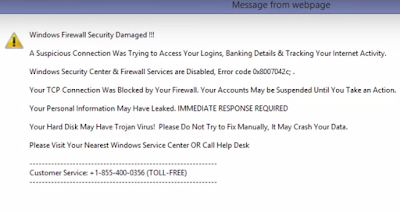
Remove Adwaresystemscanner.com Pop-up - Fake "Windows Firewall Security Damaged" Information


Do not trust a word from Adwaresystemscanner.com

Adwaresystemscanner.com pop-up offers a horrible waning message. It describes the problem with complicated words like Error code 0x8007042c, and insist that you should call 18554000356 to solve the problems. However the only right thing you need to do is to clean up your browsers and computer, because this pop-up is send by malicious programs. The related threats are brought by third party programs, they will modify your browsers setting and registry data as soon as they sneak into your PC. There can be other symptoms you will see like browsers redirecting and less computer performance.

2015-11-16

New-video24.org Pop-up Keeps Disturbing? - Guide to Stop Fake Media Update Messages

Victims Report:

  1. "A page of new-video24.org domain comes as a new tab as long as I run my Firefox. It suggests me to download a media player update. Is it reliable?"
  2. "I found that since I downloaded and install a media player updater, my browser works abnormally. It become sluggish. I also found some plugins and bookmarks on my browsers that I did not try to get."
  3. "Recently I get redirected to some irrelevant pages during my browsing. It happens frequently and I am bored with being forced to visited the pages against my will."

What is new-video24.org page exactly?


New-video24.org is actually an ad supported by the adware or malicious plugins in your computer, which pretends to be a normal media player update message. This ad aims to generate pay-per-downloaded revenue by misleading users to download its files in the name of important updates. Users who get its file will only receive an installer of unwanted programs. It is reported that these unwanted programs will badly affect your computer performance and bring some other computer problems. It can even contain virus like trojans, which is a great threat to your computer security. At least, the unwanted programs will lead to browser hijacking, your default homepage and search engines will be locked as the ineffective ones, spams and ads will flood your browsers every now and then.

The related adware or plugins can sneak into your computer when you install some messy freeware or shareware. They will bring the threats as additional tools without your permission. As a results, the modifications will be done to your browsers and registry data, so the pop-up comes to bother you again and again. You are suggested to remove the threats in time to prevent further loss.