2015-07-08

Don't Be Fooled by Paulgrenwood.com Pop-up - Fake Java Updates Removal Tips

About paulgrenwood.com Pop-up

paulgrenwood.com domain pretends to be normal free Java update, which is brought by malicious adware. The pop-up comes frequently on infected browsers like IE Firefox and Chrome. No matter what it says, you should not download anything from it.
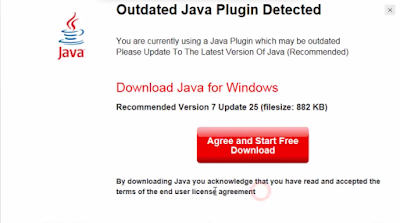

paulgrenwood.com offers suspicious program instead of real Java updates, and most of them are detected to be quite dangerous. If users get cheated by it and download more unwanted programs, they will have to bear poor computer experience. This adware can be brought by malicious sites, or it is bundled with other freeware installations. The same pop-up will keep disturbing you unless you remove it completely.
You can read the rest of this article to learn to remove it effectively.

Ads by Shoppingbuddy - How to Remove Them Quickly And Safely

How does Shoppingbuddy ads come


Shoppingbuddy is attractive to online shoppers because it claims to offers better deals and coupons according to the sites you are visiting. However it is classified as an adware for some reasons.

Shoppingbuddy is unwelcome for its way to promote. Generally this adware is bundled with third party software as an additional tool. Users have no idea about it until countless ads are displayed on the browsers.

Shoppingbuddy never miss a chance to promote its sponsor ads. The adware generate pay-per-click revenue, to achieve its purpose, it may collect your browsing habits including preferred sites and recent search terms, so that it can send targeted ads to attract your attention. If users feel interested and click the ads, the supporters of the ads benefit from the increased web traffic.

Even though you are interested in the ads, you should not click them, otherwise you may be redirected to sites contain malicious codes and get unwanted programs downloaded. The adware sends ads of other freeware, and other freeware bring such adware, that is how they help each other to occupy users' computers.

2015-07-07

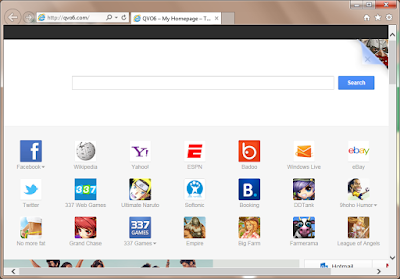
Qvo6.com Hijacked Your Browser? How to Remove It Completely and Easily?

What is Qvo6.com

Safebrowsesearch.com is a browser hijacker. Obviously you it is not a suitable search page as your default homepage because there are to many unnecessary shortcuts on it. However, some users have to face this page every time they open the browsers.


If you had installed some freeware of poor reputation, they may modify your browsers' setting without your consent. Sites contain malicious codes or virus and trojans can also make the modification secretly. You should be careful when downloading and installing freeware from unreliable resource.

This site tries to promote the related products and service by showing users the ads contain banners and pop-ups.You may see these harmful traits of this page:
  • It changes your browsers' setting and you can't reset them successfully.
  • Users are always redirected to suspicious sites. 
  • It make your browser work sluggishly to reload the unwanted ads.
  • The shortcuts on it are mostly related to sites with poor reputation.
  • You will get unwanted programs plugins and toolbars downloaded from them.
  • Strange sites are added to your Bookmarks and Favorite.

Alert.maxilivetechhelp.com Remmoval Tips - Do Not Call 1 888 981 9534

Alert.maxilivetechhelp.com pop-up

alert.maxilivetechhelp.com pop-up is not trustable, even when it has an"Alert" in the domain name. This page comes when you try to visit common pages, saying that your browsers need to be fixed and you are advised to call 1 888 981 9534 for help.


Remember that such an alerting message is bogus, it is provided by an adware. If you as it says and call the offered number, you will be taken in scams, like paying for the non-exist threats or getting expensive telephone bills.
You should rely on reputable AV programs to protect your computer instead of believing in the so-called tech support.
Such adware come to your browser if you visited sites with bad reputation or installed questionable freeware. The malicious codes will modify your browser setting and make alert.maxilivetechhelp.com come every time you open your browser. The right thing to do is to remove the adware and fix your browser, otherwise the pop-up will keep coming again and again.

2015-07-06

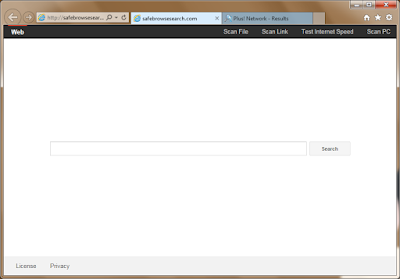
Get Rid of Safebrowsesearch.com Hijacker - How to Fix Hijacked Browser Easily

What is safebrowsesearch.com

Safebrowsesearch.com is a browser hijacker which may change your default browser homepage. It use plusnetwork.com as the search engine. Although this page looks harmless, you are advised to get rid of it for some reasons.


These harmful traits of Safebrowsesearch.com can't be ignored:
  • It changes your browsers' setting and you can't reset them successfully.
  • Its search engine plusnetwork.com offers limited search results.
  • Related ads come at the first place in the search results, they are mostly useless to users.
  • Harmful software, unwanted toolbars and plugins are brought by these sponsor links.
  • Users are always redirected to suspicious sites. 
  • Strange sites are added to your Bookmarks and Favorite.
How did your browser get hijacked?
If you had installed some freeware of poor reputation, they may modify your browsers' setting without your consent. Sites contain malicious codes or virus and trojans can also make the modification secretly. You should be careful when downloading and installing freeware from unreliable resource.

Scan.pcdiagnostic247.com Pop-up Removal Help - Get Rid of Bogus Security Alerts

What is scan.pcdiagnostic247.com pop-up

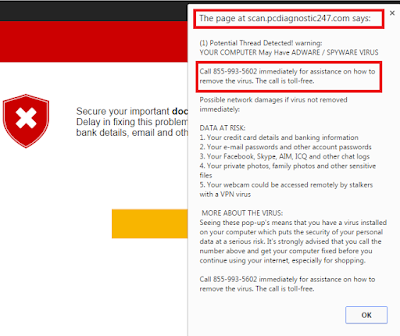
scan.pcdiagnostic247.com domain pages come suddenly on users' browser. It says there are potential threats detected on your computer and you are suggested to call 855-993-5602 for assistance.


Unfortunately your browser is infected, not by the so-called potential risks, but an adware. This is a fake security alert, it tries to lead users to call the provided number. If you as it say,you will be taken in scams, like paying for the non-exist threats or getting expensive telephone bills. You can use a reliable scanner to check your PC instead of calling a dubious number.
Such adware come to your browser if you visited sites with bad reputation or installed questionable freeware. The malicious codes will modify your browser setting and make scan.pcdiagnostic247.com come every time you open your browser. The right thing to do is to remove the adware and fix your browser, otherwise the pop-up will keep coming again and again.

2015-07-03

Free Java Security Update? - Be Careful about Javeasydownload.com Pop-up

About javeasydownload.com Pop-up

Javeasydownload.com domain pretends to be normal free Java update, which is brought by malicious adware. The pop-up comes frequently on infected browsers like IE Firefox and Chrome. No matter what it says, you should not download anything from it.


javeasydownload.com offers suspicious program instead of real Java updates, and most of them are detected to be quite dangerous. If users get cheated by it and download more unwanted programs, they will have to bear poor computer experience. This adware can be brought by malicious sites, or it is bundled with other freeware installations. The same pop-up will keep disturbing you unless you remove it completely.
You can read the rest of this article to learn to remove it effectively.